
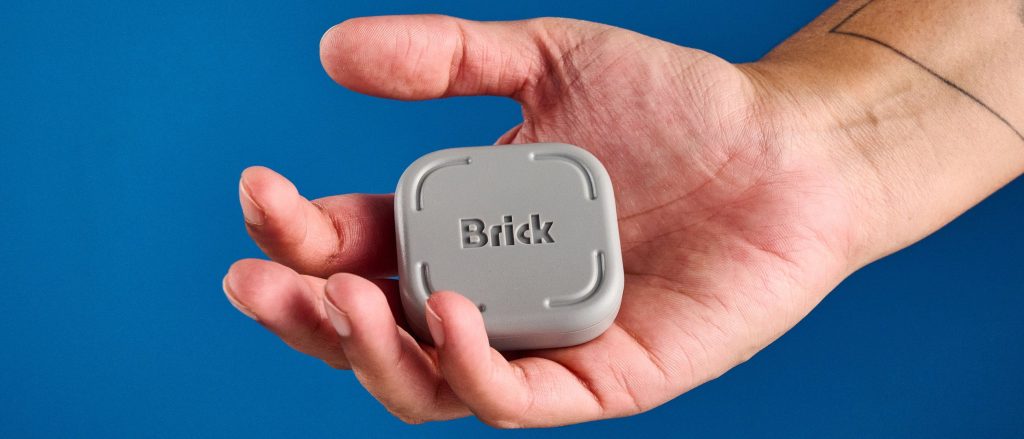
Endless scrolling on social media consumes hours of daily productivity, often without users realizing how deeply ingrained the habit has become. The Brick smartphone blocker introduces a physical, hardware-based method to break digital dependence by requiring users to physically tap their phone against a dedicated device to lock or unlock distraction-heavy applications.
This detailed evaluation examines the Brick smartphone blocker, detailing its hardware design, technical specifications, companion app setup, and real-world performance in reducing screen time. Ideal for remote workers, parents, and anyone seeking improved focus, this device leverages physical distance and environmental friction to curb impulsive phone checking.
Brick Smartphone Blocker: Key Specifications
| Feature | Specification Details |
|---|---|
| Retail Price | $59 / £44 (Single) | $106 / £80 (Two-Pack) |
| Dimensions | 2 x 2 inches |
| Weight | 3.17 ounces |
| OS Compatibility | Android 12.0 or later, iOS 17.0 or later |
| Hardware Tech | Passive NFC chip (No batteries required) |
| Base Material | Anti-slip silicone with internal magnets |
Pricing, Bundles, and Market Competitors
The Brick is available directly from the manufacturer for $59 in the United States and £44 in the United Kingdom. Families or multi-device users can purchase a two-pack bundle for $106 / £80. An optional mounting bracket is offered for $15 / £14, though its built-in magnetic backing and non-slip silicone base make additional accessories unnecessary for most home setups.
Alternative products exist on the market, such as the Bloom card-style blocker priced at $39, as well as customizable DIY NFC tags paired with open-source software like Foqos. However, card-shaped devices easily fit inside a wallet, keeping the unlocking mechanism right next to the user and defeating the purpose of physical separation. Software-only app blockers like Opal can often be toggled off directly inside settings, lacking the physical barrier required to enforce self-control.
Design and Build Quality
The physical design of the Brick is simple and functional—a compact gray square measuring two inches on each side. Weighing 3.17 ounces, it feels solid and well-constructed without cluttering desks, nightstands, or countertops.
The bottom of the device features a high-friction silicone layer that keeps it firmly anchored on polished wood or glass surfaces. Integrated internal magnets allow users to store the unit on metal surfaces such as a refrigerator, keeping it easily accessible yet out of immediate reach while working or relaxing.
How Near Field Communication (NFC) Technology Works
Unlike standard Bluetooth accessories, the Brick operates completely without internal batteries or charging cables. It houses an embedded Near Field Communication (NFC) chip that exchanges a quick proximity signal when tapped by a compatible smartphone, prompting the companion software to engage or release your selected app restrictions.
NFC technology requires extremely close contact—within fractions of an inch—unlike long-range Radio-frequency Identification (RFID) systems. Unlocking a phone requires getting up, walking to where the Brick is stored, and tapping the device. By forcing physical movement, the system turns basic human reluctance to expend extra effort into a tool for habit change.
If access to a restricted app becomes urgent while away from the hardware, the app provides five built-in emergency unlocks per account. Additionally, a single physical Brick can manage an unlimited number of smartphones equipped with the companion app, making it a cost-effective setup for shared households and office environments.
Companion App Configuration and Custom Profiles
The free companion app allows users to create customized distraction profiles tailored to different times of day, such as a focused work mode or a digital detox mode for evenings.
To enforce accountability, turning on Strict Mode prevents users from overriding an active block by deleting the application. The software can also block app store downloads, in-app purchases, and mature content, allowing it to serve as a centralized parental control tool across multiple family devices.
Real-World Testing and Screen Time Results
Testing the device highlights how frequently passive phone checking happens during short downtime moments. Idle periods—such as waiting for coffee to brew or queuing in line—frequently trigger automatic taps on social media icons without conscious thought.
During testing, active social media usage plummeted from nearly seven hours per day down to just one hour and fifteen minutes. Requiring a walk to another room to unlock apps interrupts routine checking habits, making it significantly easier to focus on reading, household tasks, and healthier evening routines.
Frequently Asked Questions
Does the Brick require batteries or charging cables?
No, the device relies on passive Near Field Communication (NFC) technology. It requires no internal battery or power supply, drawing power briefly from the smartphone’s magnetic field during a tap.
Can multiple phones share a single Brick device?
Yes, one physical Brick can manage restrictions for an unlimited number of smartphones, provided each device has the free companion app installed and configured.
How do emergency unlocks work if I am away from home?
The companion app includes five emergency overrides per user account. These allow temporary access to blocked applications without needing physical contact with the hardware unit.