
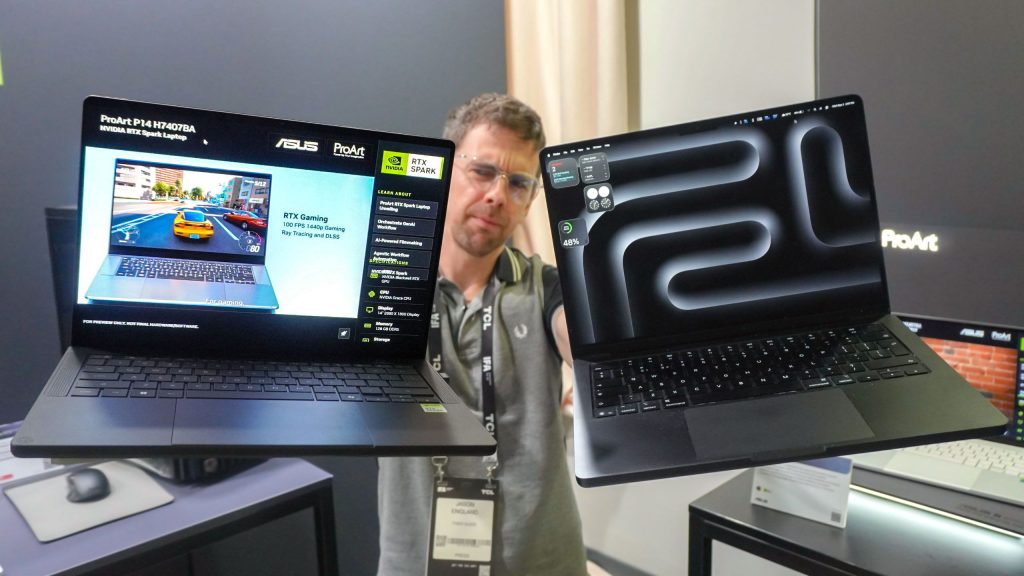
Carrying two laptops—one for demanding creative software and another for PC gaming—remains a major point of friction for power users. The Asus ProArt P14 aims to eliminate this dual-device setup by pairing Nvidia’s ARM-based RTX Spark silicon with a compact chassis built to rival Apple’s 14-inch MacBook Pro.
This direct comparison evaluates the Asus ProArt P14 against Apple’s 14-inch MacBook Pro across design, display tech, and hardware architecture. Featuring Nvidia RTX Spark N1X silicon, the ProArt P14 offers dedicated Blackwell graphics and ARM efficiency, presenting a unified solution for creative professionals who require native AAA gaming and heavy content creation performance on Windows.
Form Factor and Physical Specifications
Asus engineered the ProArt P14 with a footprint that closely mirrors the 14-inch MacBook Pro, matching Apple almost millimeter for millimeter. Despite these similar physical boundaries, tactile differences emerge upon closer inspection.
The ProArt P14 features a matte charcoal finish with a textured grip, contrasting with Apple’s smooth anodized aluminum shell. In hand, the MacBook Pro feels denser due to balanced internal weight, whereas the ProArt P14 distributes its mass toward heavy-duty rear thermal vents designed to cool high-performance components.
| Specification | Asus ProArt P14 | Apple MacBook Pro 14 (M5) |
|---|---|---|
| Physical Dimensions | 12.2 x 8.6 x 0.6 inches | 12.3 x 8.7 x 0.6 inches |
| Total Weight | 3.3 pounds | 3.4 pounds |
| Display Type | 14-inch 2.8K (2800 x 1800) OLED | 14.2-inch (3024 x 1964) Mini-LED |
| Hardware Architecture | Nvidia Grace CPU + Blackwell RTX GPU | Apple M5 Series Unified Silicon |
| Available Ports | USB-A, USB-C, HDMI, SD Card, Audio | USB-C / Thunderbolt, HDMI, SD Card, Audio |
Port accessibility gives Asus a slight practical edge. While both laptops supply full-size HDMI ports, high-speed USB-C, headphone jacks, and SD card readers, the ProArt P14 includes a legacy USB-A port. This addition allows users to connect older peripherals without needing external adapters.
Display Performance: 2.8K OLED vs Liquid Retina XDR
The 14-inch 2.8K OLED panel on the ProArt P14 delivers true black levels, infinite contrast, and instantaneous pixel response times. Additionally, it lacks the top screen notch found on macOS hardware, providing a clean display border well-suited for color grading and media consumption.
Apple’s Liquid Retina XDR panel uses Mini-LED technology, which typically provides higher sustained peak brightness levels. While the OLED panel on the ProArt P14 excels in controlled studio lighting and color accuracy, Apple’s display maintains better visibility in bright outdoor environments.
Keyboard Ergonomics and Trackpad Precision
Keyboard design highlights contrasting usability priorities between the two machines. The ProArt P14 incorporates dished keycaps with deeper physical key travel and softer dampening, offering improved tactile feedback during extended gaming sessions.
Apple relies on shallow, crisp scissor switches set into a recessed keyboard well. This design provides steady, fatigue-free typing for long writing sessions. However, Apple holds a clear advantage in trackpad technology; its haptic Force Touch system provides uniform click feel across the entire glass surface without mechanical dead zones.
Silicon Performance: Nvidia RTX Spark N1X vs Apple Silicon
The core advantage of the ProArt P14 lies in its Nvidia RTX Spark N1X platform. This chip couples an ARM-based Nvidia Grace CPU with a dedicated Blackwell RTX GPU, configurable with up to 128GB of unified memory. Entry-level models start with scaled core counts and 24GB of system memory.
While Apple Silicon delivers high energy efficiency across video editing and rendering tasks, macOS remains restricted in native gaming support. Emulation layers and cloud streaming struggle to replace native execution. The ProArt P14 runs native Windows titles at 1440p resolution around 100 FPS, leveraging DLSS upscaling technology and native anti-cheat support.
Thermal Output, Battery Life, and Value
Cooling high-end Nvidia silicon in a slim body requires aggressive fan profiles. During heavy gaming loads, the ProArt P14 generates noticeably higher acoustic noise than the MacBook Pro, which stays virtually silent during standard workflows.
Real-world battery endurance remains the biggest variable for Nvidia’s platform. Nvidia promises full-day operating time without performance degradation when unplugged. If real-world testing proves 12 to 14 hours of continuous battery life, it will close the historical efficiency gap between Windows laptops and Apple Silicon.
Final Comparison Summary
The choice between these two platforms comes down to specific software needs and gaming priorities:
- Choose the Asus ProArt P14: If you need a single machine that handles professional content creation during work hours and native Windows PC gaming without carrying secondary hardware.
- Choose the MacBook Pro 14: If your workflow relies heavily on macOS software, and you prioritize whisper-quiet cooling, haptic trackpad accuracy, and proven multi-day standby efficiency.
Frequently Asked Questions
Does the Asus ProArt P14 run PC games better than a MacBook Pro?
Yes. The ProArt P14 uses Nvidia’s RTX Spark N1X hardware, which natively executes Windows PC games with full support for DirectX, DLSS upscaling, and anti-cheat engines. macOS requires translation layers or cloud services to run most modern AAA games.
How does the display on the ProArt P14 compare to the MacBook Pro 14?
The ProArt P14 uses a 2.8K OLED screen offering infinite contrast ratios and faster pixel response times. The MacBook Pro uses a Mini-LED display that delivers higher sustained peak brightness, making Apple’s screen easier to view under direct sunlight.
What ports are available on the Asus ProArt P14?
The ProArt P14 includes high-speed USB-C ports, a full-size HDMI port, a full-size SD card slot, an audio jack, and a legacy USB-A port. The extra USB-A port allows users to plug in traditional accessories without requiring extra USB hubs.