
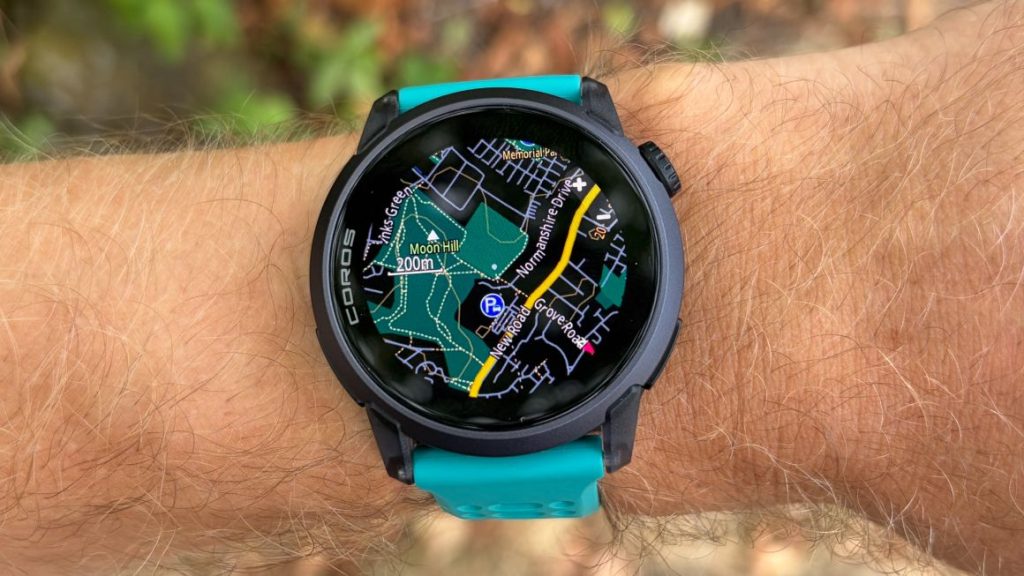
Runners and triathletes using the Coros Pace 4 can now access built-in navigation capabilities previously reserved for higher-end devices, thanks to a surprise software update. However, taking full advantage of turn-by-turn routing requires navigating a strict hardware constraint.
Direct Summary: This update enables turn-by-turn route tracking and offline topographic maps on the $249 Coros Pace 4 through the official Coros app public beta. While it significantly boosts navigation functionality for budget-conscious endurance athletes, users must manage map downloads selectively due to the watch’s limited onboard storage space.
Understanding the Coros Pace 4 Map Update
Coros has earned a reputation for continually pushing firmware enhancements to older and entry-level hardware. The addition of offline maps to the Pace 4 stands out as one of the brand’s most substantial feature additions, positioning the device against far more expensive sports watches.
Using the new system, athletes can follow pre-planned courses with clear turn directions and view live map displays directly on the watch’s bright AMOLED screen during outdoor runs, rides, or hikes.
The Storage Constraint: Managing the 4GB Memory Cap
While offline map support is a major addition to an entry-level sports watch, hardware limits come into play. The Pace 4 ships with 4GB of total internal storage, which is substantially less than the 16GB or 32GB found on premium navigation watches.
System software and essential onboard data consume more than half of that storage right out of the box. Without any audio files loaded onto the watch, users will find roughly 1.6GB of available space for storing offline mapping data.
Fortunately, regional map tiles are reasonably condensed. For instance, map packages covering London and South East England require around 151.2MB, while regional maps for New York and Philadelphia take up approximately 122.4MB. Users can easily store their immediate home region and temporary travel destinations, provided they do not overload the device with local music files.
Coros Pace 4 Mapping Overview
| Feature / Specification | Details |
|---|---|
| Supported Model | Coros Pace 4 ($249 MSRP) |
| Total Internal Memory | 4GB (Approx. 1.6GB available for maps/music) |
| Map Transfer Method | Direct Wi-Fi download via Coros app tile grid |
| Navigation Capabilities | Offline maps, route tracking, turn-by-turn guidance |
| Software Requirement | Coros Mobile App (Public Beta enrollment required) |
How to Download and Install Offline Maps on the Pace 4
Getting offline mapping ready on your Coros Pace 4 requires a few quick setup steps within the companion mobile application:
- Join the Public Beta: Download the beta version of the Coros app and pair your watch to check for available firmware updates.
- Select Map Grid Tiles: Access the map manager section within the app. Coros divides the world into preset grid squares rather than whole countries, displaying exact file sizes for each tile.
- Initiate Wi-Fi Sync: Select the geographic regions you need and trigger the download over Wi-Fi to save the map tiles directly to your watch storage.
- Create and Sync Routes: Use the Explore tab in the Coros app to build custom routes, then send them straight to your Pace 4 for turn-by-turn guidance.
During outdoor workouts, pressing the action dial toggles the display between numerical training metrics and full-color course maps. Although the display screen is compact, the high-contrast screen makes active route tracing straightforward on the go.
Frequently Asked Questions
How much storage space is available for maps on the Coros Pace 4?
The Coros Pace 4 comes with 4GB of onboard memory, but core operating system data leaves around 1.6GB of free space. This is plenty of room for multiple local regions, though downloading heavy music files will limit map capacity.
Do you need a phone connection to view maps while running?
No phone connection is necessary during workouts. Once map regions and routes are synced over Wi-Fi through the Coros app, the watch renders maps and handles turn-by-turn guidance completely offline.
How do you select map regions to install on the watch?
In the Coros mobile application, maps are organized into preset geographic grid squares. You select the specific squares you need, review their storage footprints, and download them to the watch over a home Wi-Fi network.