
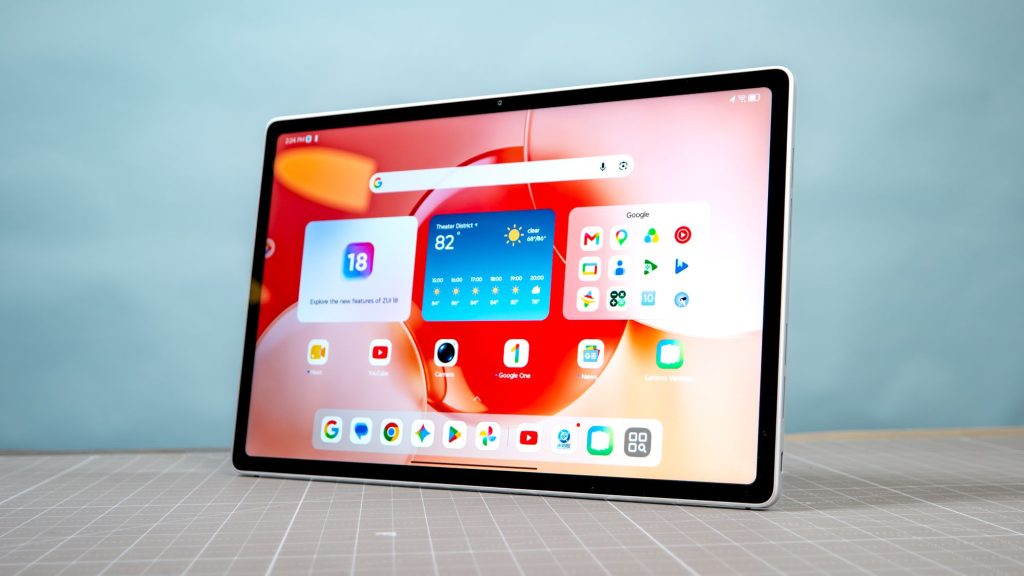
Finding a reliable tablet no longer means automatically defaulting to Apple’s lineup. Modern Android slates offer outstanding displays, multi-day battery stamina, and powerful processors that excel at media playback, digital drawing, and daily multitasking, often at lower price points.
This hands-on guide evaluates the top five tested Android tablets across critical categories, including overall performance, value, entertainment, gaming, and screen size. Whether you need an affordable browser for the family or a high-refresh OLED workstation for travel, these expert recommendations highlight the best options currently available.
Top Android Tablets Overview
Below is a direct comparison of our top-rated tested slates, detailing their primary strengths, panel specs, silicon, and real-world battery benchmarks.
| Model | Category | Display Specs | Processor | Battery Life (Lab Test) |
|---|---|---|---|---|
| Samsung Galaxy Tab S10 FE Plus | Best Overall | 13.1-inch LCD (2880 x 1800), 90Hz | Exynos 1580 | 15 hours 43 minutes |
| Motorola MotoPad | Best Budget | 11-inch LCD (2560 x 1600), 90Hz | MediaTek Dimensity 6300 | 10 hours 31 minutes |
| Lenovo Tab Plus Gen 2 | Best Streaming | 12.1-inch 2.5K LCD (2560 x 1600), 90Hz/120Hz | MediaTek Dimensity 7400 | 16 hours (at 60Hz) |
| RedMagic Astra 2 | Best Gaming | 9.06-inch OLED (2400 x 1504), 185Hz | Snapdragon 8 Elite Gen 5 | 11 hours 28 minutes |
| Samsung Galaxy Tab S11 Ultra | Best Big Screen | 14.6-inch OLED (2960 x 1848), 120Hz | MediaTek Dimensity 9400+ | 12 hours 03 minutes |
Detailed Breakdown of the Top Android Tablets
1. Samsung Galaxy Tab S10 FE Plus — Best Overall
The Samsung Galaxy Tab S10 FE Plus earns the top recommendation by balancing expansive display real estate, reliable performance, and exceptional power efficiency. Its sharp 13.1-inch LCD screen provides generous room for taking notes, viewing video content, and managing daily browser tabs.
Powered by the Exynos 1580 chipset with storage expandable up to 2TB via microSD, it smoothly manages everyday multitasking. With a tested battery life exceeding 15.5 hours and a commitment for seven years of software updates, it stands out as a long-lasting, practical investment.
- Pros: Excellent value, expansive 13.1-inch display, stellar battery longevity, 7-year software update commitment.
- Cons: Chipset struggles under heavy 3D gaming, lacks flagship AI feature suite.
2. Motorola MotoPad — Best Budget Option
If you need an affordable slate for basic entertainment, web browsing, and reading, the Motorola MotoPad delivers high value at under $250. Its 11-inch screen covers 112% of the sRGB color space, producing vivid visuals for movie streams and photo viewing.
The MediaTek Dimensity 6300 chip handles everyday tasks efficiently, though graphic-heavy mobile titles are off-limits. With over 10.5 hours of tested battery life and microSD storage expansion, it serves as an ideal entry-level tablet for families.
- Pros: Extremely affordable price tag, colorful 11-inch display, solid audio, lightweight design.
- Cons: Weak graphics performance, basic hardware finishes.
3. Lenovo Tab Plus Gen 2 — Best for Streaming
Engineered specifically for media enthusiasts, the Lenovo Tab Plus Gen 2 pairs a sharp 12.1-inch 2.5K panel with a room-filling JBL-tuned speaker system. Sound output remains punchy and clear, making dialogue crisp and musical bass deep without requiring external headphones.
In endurance testing, this device logged 16 hours of continuous web browsing at 60Hz. A built-in kickstand allows effortless setup on nightstands or desk surfaces, solidifying its place as the top portable theater option.
- Pros: Outstanding speaker quality, sharp 2.5K screen, built-in kickstand, impressive 16-hour battery endurance.
- Cons: Heavier design can feel awkward to hold long-term, not intended for heavy work applications.
4. RedMagic Astra 2 — Best for Gaming
Built for uncompromised mobile performance, the RedMagic Astra 2 packs a high-tier Qualcomm Snapdragon 8 Elite Gen 5 processor and an ultra-fast 185Hz 9.06-inch OLED panel. High-frame-rate titles run smoothly, and the tablet can even handle PC game emulation via built-in software hubs.
Dual USB-C ports provide versatile connectivity, while the compact 0.8-pound body fits easily into handheld mobile game controllers. While premium-priced, it delivers unmatched frame rates and visual fidelity for competitive gamers.
- Pros: Top-tier Snapdragon performance, gorgeous 185Hz OLED display, highly portable build, dual USB-C interfaces.
- Cons: Expensive, RedMagic OS user interface lacks software polish, off-center main port placement.
5. Samsung Galaxy Tab S11 Ultra — Best Big Screen Workstation
For users seeking a desktop-class viewing experience, the Samsung Galaxy Tab S11 Ultra centers around a massive 14.6-inch OLED panel. Despite its laptop-sized footprint, the device maintains a remarkably thin and lightweight profile that remains easy to slip into a backpack.
Equipped with a MediaTek Dimensity 9400+ processor and 12GB of RAM, it handles split-screen multitasking, drawing, and media editing with ease. S Pen support and over 12 hours of battery stamina make it a premium choice for creative professionals and power users.
- Pros: Stunning 14.6-inch OLED panel, slim and lightweight chassis, strong multitasking performance, long battery life.
- Cons: Premium price tier, physical footprint makes handheld use awkward.
Comparing Battery Endurance
Battery longevity remains a vital consideration for mobile computing. In standardized testing (browsing over Wi-Fi at 150 nits display brightness), these Android tablets routinely outperformed competing slates like the iPad Air M4 (9 hours 44 minutes).
The Lenovo Tab Plus Gen 2 led the group at 16 hours, closely followed by the Samsung Galaxy Tab S10 FE Plus at 15 hours 43 minutes. Even high-power models like the Galaxy Tab S11 Ultra and RedMagic Astra 2 cleared the 11-to-12-hour mark easily.
Other Notable Models Tested
Beyond our primary top picks, several specialized Android and e-paper slates are worth noting depending on your workflow:
- Google Pixel Tablet: A unique option that functions as a smart display hub when docked, ideal for home control and casual streaming.
- Amazon Kindle Scribe (2025): Features a distraction-free 11-inch e-paper display and included pen for dedicated readers, students, and note-takers.
- Samsung Galaxy Tab S10 Plus: Sits comfortably between base models and the Ultra, offering high-end OLED visuals and AI features under $1,000.
How to Select the Right Android Slate
Choosing the ideal tablet comes down to your primary usage pattern:
- Media & Streaming: Prioritize speaker quality, panel brightness, and kickstand ergonomics (e.g., Lenovo Tab Plus Gen 2).
- Everyday Family Use & Notes: Look for balanced performance, expandable storage, and long software update support (e.g., Samsung Galaxy Tab S10 FE Plus).
- Heavy Gaming: Focus on high display refresh rates (120Hz+) and flagship silicon (e.g., RedMagic Astra 2).
- Laptop Replacement & Art: Opt for larger screen real estate, stylus support, and expanded RAM (e.g., Samsung Galaxy Tab S11 Ultra).
Frequently Asked Questions
Are Android tablets better than Apple iPads?
Android tablets offer greater diversity in pricing, wider hardware variety, flexible file management, and expandable storage options via microSD. While iPads deliver top-tier benchmark speeds and app optimization, Android slates often provide larger, brighter displays and superior battery life at lower costs.
How long do Android tablets typically receive updates?
Lifespans vary by price point and manufacturer. Entry-level budget models typically receive two to three years of security patches, whereas flagship devices from brands like Samsung offer up to seven years of major OS and security upgrades.
Can an Android tablet fully replace a traditional laptop?
An Android slate can comfortably replace a laptop for web browsing, office docs, media streaming, and note-taking when paired with a keyboard accessory. However, users requiring specialized desktop software, complex file management, or heavy video editing will still benefit from a dedicated laptop.