
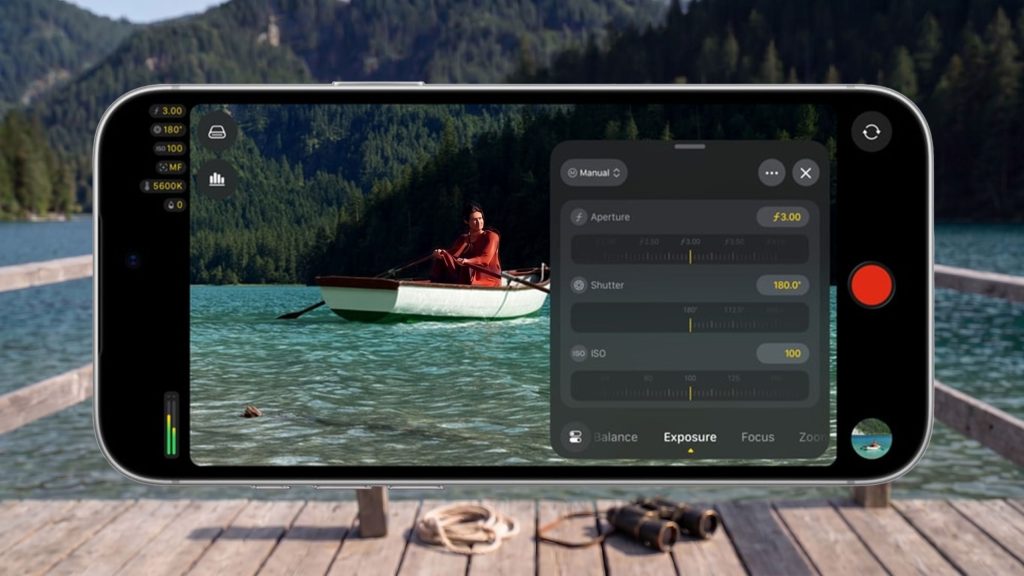
Smartphone videographers looking for precise manual control over their footage often find standard camera software limiting. Apple’s latest software update addresses this gap directly, bringing advanced optical controls to its dedicated video capture application.
Apple updated Final Cut Camera to version 2.4, introducing native support for the iPhone 18 Pro and Pro Max variable aperture lens system. The update lets content creators manually dial in optical aperture settings, utilize shutter and aperture priority shooting modes, customize viewfinder overlays, and refine focus points in ProRes and Apple Log formats post-capture.
Overview of Final Cut Camera Version 2.4 Capabilities
While the standard iOS Camera app handles everyday recording smoothly with HDR, Cinematic mode, and slow-motion options, it lacks immediate access to fine-tuned manual settings. Final Cut Camera organizes essential production controls on a dedicated interface, allowing users to tweak color profiles, frame rates, and encoding formats on the fly.
Version 2.4 refines this layout with customizable overlays. Shooters can quickly modify ISO, white balance, and shutter angle without navigating deep sub-menus. The app also adds a visible tally light during recording and a two-finger tap command to hide on-screen controls for an unobstructed preview.
Final Cut Camera 2.4 Update Summary
| New Feature / Upgrade | Key Functionality | Target Hardware / Environment |
|---|---|---|
| Variable Aperture Support | Manual aperture adjustment, Shutter Priority, and Aperture Priority modes | iPhone 18 Pro & Pro Max |
| Viewfinder Controls | Two-finger tap to clear UI, custom overlays for ISO, shutter angle, and white balance | iOS Supported Devices |
| Production Tools | Tally light recording indicator, professional video scopes, clean SDI output, and genlock offset | iOS 27 System Integration |
| Post-Production Integration | Cinematic mode depth-of-field and focus point adjustments for ProRes and Apple Log | Final Cut Pro Editing Workflow |
How the Variable Aperture Controls Work
The standout feature in version 2.4 is native integration with the physical variable lens on the iPhone 18 Pro series. Directors and cinematographers can take direct control over depth of field and light throughput directly from the recording display.
Users can select shutter priority mode to lock exposure speed for consistent motion blur while allowing the aperture to adjust automatically. Alternatively, switching to aperture priority mode lets creators fix the focal depth for background separation, leaving exposure balance to automatic shutter adjustments.
Enhanced Editing and Professional Video Workflows
Beyond capturing footage, version 2.4 expands editing flexibility when paired with Final Cut Pro. Video captured in higher-end formats like ProRes and Apple Log now retains depth data, enabling editors to alter focus points and tweak cinematic blur effects after shooting.
Additionally, broader system updates in iOS 27 introduce broadcast-level output options. Video teams can now utilize live professional video scopes, stream a clean feed via SDI output, and manage multi-camera setups using precise genlock offset timing.
Frequently Asked Questions
Does Final Cut Camera work on older iPhone models?
Final Cut Camera is compatible with multiple iOS devices, but specific features like variable aperture control require the physical hardware found exclusively on the iPhone 18 Pro and Pro Max models.
Can I adjust depth of field after recording in Apple Log?
Yes, version 2.4 enables Cinematic mode effects for ProRes and Apple Log recordings, allowing you to re-adjust focus points and depth of field inside Final Cut Pro during post-production.
How do I clear the on-screen overlays while framing a shot?
You can hide the control interface and view an unobstructed preview by performing a two-finger tap directly on the viewfinder screen inside the app.