
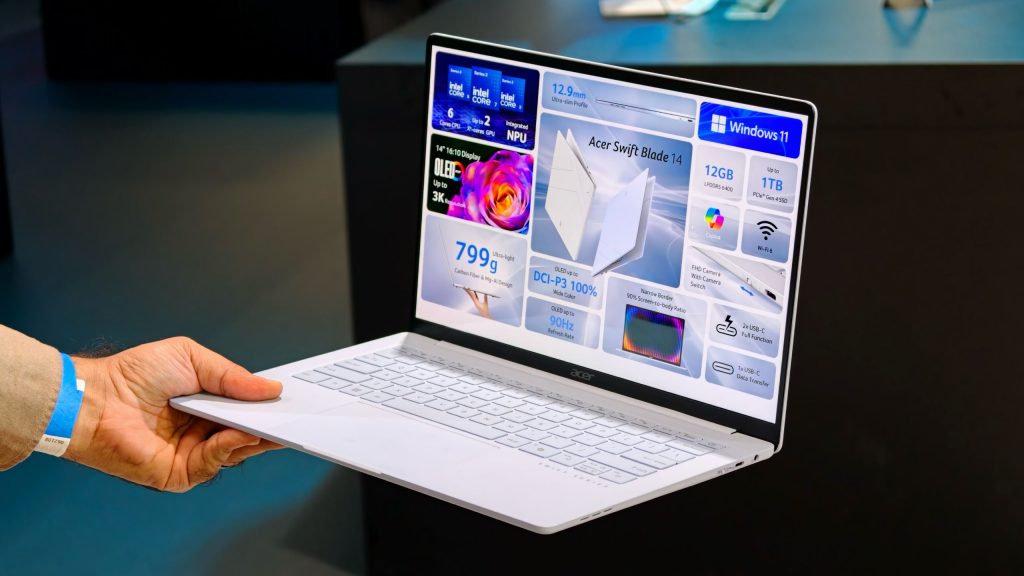
Chasing the ideal ultraportable device often forces users to choose between screen size and physical weight. Standard 14-inch notebooks usually cross the 2.5-pound threshold, making them noticeably heavier during daily commutes or extended travel.
The Acer Swift Blade 14 addresses this exact challenge by offering a 14-inch Windows notebook that weighs only 799 grams (1.7 pounds). Equipped with Intel Core Series 3 processors and an available 3K OLED panel, this ultra-light machine targets frequent travelers and mobile professionals, though achieving its featherweight profile requires clear compromises in keyboard rigidity and input ergonomics.
Featherweight Engineering and Chassis Construction
Picking up the Swift Blade 14 for the first time is a striking experience. At under 800 grams, the machine feels lighter than a 13-inch iPad Pro combined with Apple’s Magic Keyboard. Available in Marshmallow White and Marshmallow Blue, its visual profile mirrors traditional thin-and-light laptops, hiding just how little mass it carries.
To reduce overall weight without sacrificing basic durability, Acer constructed the housing from a hybrid blend of ultra-light carbon fiber and magnesium-aluminum alloy. While the surface texture feels somewhat like textured plastic upon initial handling, the display lid remains surprisingly rigid and resists flexing under moderate pressure.
The Sacrifices: Keyboard Flex and Trackpad Feel
Reaching an extreme weight target usually demands engineering trade-offs, and on the Swift Blade 14, those trade-offs appear in the input devices. Although the trackpad provides a generous surface area, it lacks the firm, tactile click feedback found on higher-end ultraportables.
The keyboard deck also reveals structural compromise. Firm keystrokes cause visible flexing across the typing surface, which may disappoint users who prefer a stiff, mechanical-feeling deck during long typing sessions.
Key Specifications Overview
| Feature | Specification Details |
|---|---|
| Starting Weight | 799 grams (1.7 lbs) |
| Processor | Intel Core Series 3 (up to Core 7 350) |
| Display Options | 14-inch 3K OLED (anti-reflective) or 60Hz IPS LCD |
| Memory & Storage | 12GB LPDDR5 RAM / Up to 1TB SSD |
| Battery Capacity | 50Wh |
| Port Selection | Dual USB-C (left side), USB-C (right side), 3.5mm audio jack |
| Privacy Features | Hardware webcam kill switch |
Performance Hardware, Display Choices, and Connectivity
Despite its ultra-thin chassis, Acer maintained functional internal hardware. The laptop runs on Intel Core Series 3 chips, topping out at the Core 7 350 configuration. System memory is set at 12GB of LPDDR5 RAM, paired with up to 1TB of solid-state storage.
Visual performance relies on a 14-inch 3K OLED display equipped with an anti-reflective coating for enhanced outdoor viewing. Acer also plans a lower-cost variant featuring a standard 60Hz IPS LCD screen. A 50Wh battery powers the system, offering sufficient capacity for standard daily computing tasks on the go.
Physical ports remain practical for daily connectivity. Dual USB-C ports sit on the left edge, alongside an additional USB-C port and a 3.5mm audio jack on the right. A dedicated hardware toggle switch sits on the chassis side, allowing users to disconnect the webcam instantly for added privacy security.
Regional Availability and Launch Timeline
Acer confirmed that the Swift Blade 14 will launch in European markets toward the end of the year. Specific launch dates, configuration pricing, and official release plans for North America have not yet been announced.
Frequently Asked Questions
How much does the Acer Swift Blade 14 weigh?
The laptop weighs approximately 799 grams (1.7 pounds). This makes it lighter than several popular tablet-plus-keyboard combinations, such as the 13-inch iPad Pro with a Magic Keyboard.
What processors power the Acer Swift Blade 14?
The system utilizes Intel Core Series 3 processors, with higher-end configurations offering up to the Intel Core 7 350 processor alongside 12GB of LPDDR5 RAM.
Does the Swift Blade 14 include hardware privacy features?
Yes, the device includes a physical webcam switch mounted on the side of the chassis, enabling users to turn off the camera completely at the hardware level.