
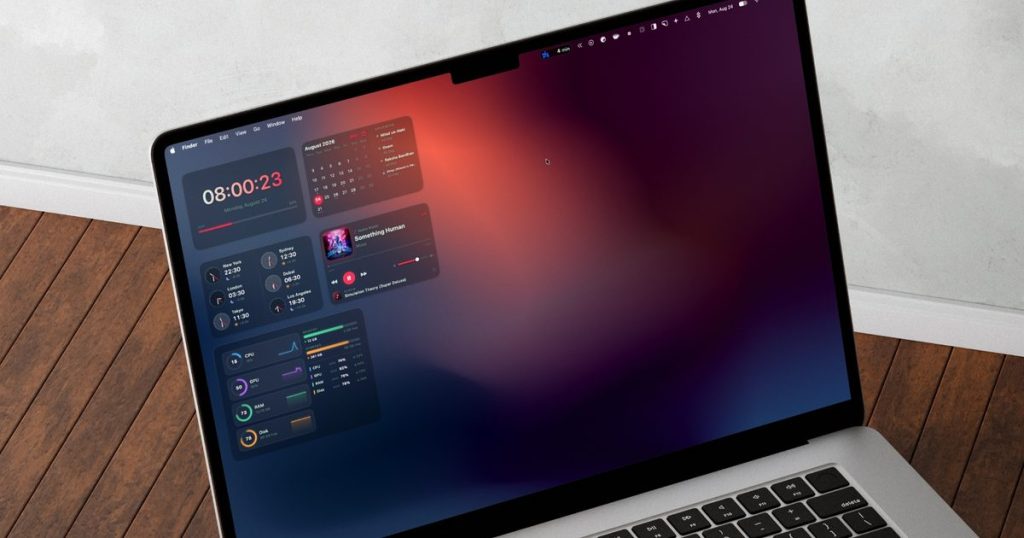
When Apple introduced desktop widgets in macOS Sonoma, many Mac users eagerly dragged a few onto their screens only to remove them minutes later due to rigid layouts and sparse third-party support. However, a dedicated utility called BetterMacWidgets redefines desktop customization by delivering over 20 sleek, highly customizable tiles that seamlessly blend into the native macOS aesthetic.
Direct Summary: This article evaluates how BetterMacWidgets optimizes macOS desktop utility through real-time system monitoring, interactive music controllers, two-way Apple Reminders synchronization, and dynamic layout management. Designed for Mac power users wanting an iPhone-style customization experience, the application fixes native layout limitations using adjustable glass themes, smart widget stacks, and context-aware profile triggers.
Beyond Native Limitations: Flexible Desktop Placement
Apple’s built-in widgets remain tethered to system applications with minimal design flexibility. BetterMacWidgets reverses this constraint by providing a collection of more than 20 versatile widgets that snap cleanly onto an invisible desktop grid. Users can position elements wherever they prefer while maintaining a structured, aligned desktop surface.
Scale options are equally adaptable, offering up to six distinct tile sizes ranging from a compact 1×1 square to an expansive 4×3 block. For instance, the Now Playing widget displays current album artwork alongside track metadata while providing direct play, pause, and skip controls straight from the desktop surface.
Resource-Efficient Gauges and Interactive Tools
Monitoring system hardware remains a core draw for Mac enthusiasts. The app features a System Stats widget equipped with live gauges for CPU load, GPU performance, memory usage, and storage capacity, alongside a battery graphic that visually sloshes during charging cycles. Importantly, these animations pause whenever covered by active application windows to eliminate unnecessary background processor overhead.
Everyday organization tools receive similar performance upgrades. The Reminders widget offers live two-way sync with Apple Reminders, enabling users to mark off completed items directly on screen. Combining this tool with the included Sticky Note module builds a dedicated productivity corner right on your wallpaper.
Feature Overview and Tier Comparison
| Feature Category | Key Capabilities | Tier Availability |
|---|---|---|
| Widget Selection | 20+ utilities including System Gauges, Weather, Now Playing, and Reminders | Free & Pro Options |
| Grid & Sizing | 6 sizing presets (1×1 to 4×3) with automatic alignment snapping | Free Feature |
| Space Management | Widget Stacks supporting hover navigation and automatic rotation | Free Feature |
| Visual Themes | Frosted glass opacity sliders, Clear floating look, and 20 color presets | 3 Free Themes / Full Set in Pro |
| Smart Workflows | Custom profile switching based on display, active app, or time of day | Included in Pro |
Clutter Control with Widget Stacking
When high widget counts threaten to obscure wallpaper space, the Widget Stacks feature consolidates screen area. Dropping one widget directly on top of another of identical dimensions merges them into a single tile. Users can manually cycle through stacked tools using hover arrows or configure them to rotate continuously on a timer.
Stacking logic enforces strict dimensional rules to prevent accidental overlaps. Dropping incompatible sizes together simply nudges adjacent tiles into the nearest available grid coordinate, preserving clean desktop symmetry without requiring manual readjustments.
Styling and Contextual Profile Automation
Visual customization is where the software closely mimics native Apple design standards. The application includes 20 preset themes that modify accent tones, window tinting, and typography. A Frosted finish lets users dial in subtle translucent backgrounds, while the Pro tier’s Clear look strips away borders entirely, casting subtle drop shadows behind floating text and icons.
To support changing workflows, users can save distinct widget arrangements as named profiles. Through Smart Switching, the app can automatically swap desktop profiles based on connected external monitors, the active foreground application, or specific times of day.
Frequently Asked Questions
Does running animated widgets drain Mac battery life?
BetterMacWidgets automatically pauses all active animations whenever widget tiles are hidden behind open application windows. You can also permanently disable specific animations, such as the battery indicator effect, within the app settings to conserve energy.
Can I stack widgets of different dimensions together?
Widget Stacking only functions between tiles of identical dimensions, such as pairing two 2×2 blocks. Placing mismatched sizes over one another will automatically push the top tile into the nearest open slot on the invisible desktop grid.
How does the app gather local weather information?
The weather tile pulls accurate meteorology data directly from Open-Meteo. It can determine your location automatically using precise or approximate system positioning, or you can manually enter any city name in the widget settings.