
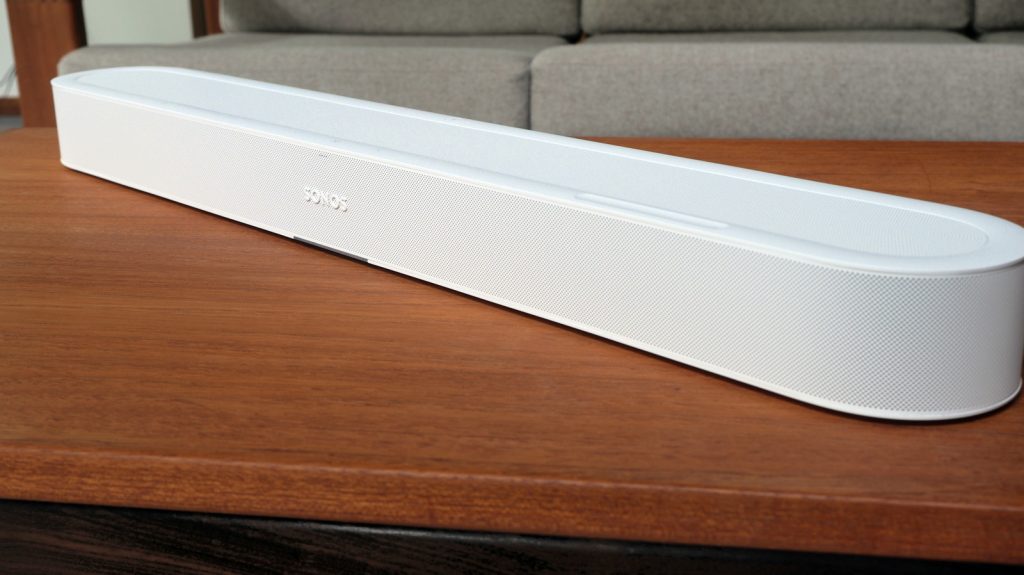
Finding a soundbar that delivers genuine Dolby Atmos without requiring a massive budget or dominating your TV setup has long been a challenge for home theater enthusiasts. The Sonos Beam Ultra solves this dilemma by delivering authentic 7.1.2-channel spatial audio with dedicated upward-firing drivers at a balanced price point. Positioned directly between the compact Beam (Gen 2) and the flagship Arc Ultra, this mid-sized soundbar provides true overhead sound, updated wireless connectivity, and flexible rear speaker options for living rooms spanning 250 to 350 square feet.
Sonos Soundbar Lineup Comparison
To understand where the Beam Ultra fits within the home theater landscape, it helps to examine how its hardware and features compare against nearby models in the lineup.
| Feature / Spec | Sonos Beam (Gen 2) | Sonos Beam Ultra | Sonos Arc Ultra |
|---|---|---|---|
| Price | $499 | $699 | $1,099 |
| Channel Configuration | 5.1.2 (Virtual Height) | 7.1.2 (True Height) | 9.1.4 (True Height) |
| Upward-Firing Drivers | No (Simulated via front drivers) | Yes (2 dedicated height tweeters) | Yes (Dedicated height array) |
| Wireless Connectivity | Wi-Fi 4 | Wi-Fi 6, Bluetooth 5.3 | Wi-Fi 6, Bluetooth 5.3 |
| Width | 25.6 inches | ~30 inches | 45 inches |
| Target Room Size | Small living spaces / bedrooms | Mid-sized rooms (250–350 sq ft) | Large open home theaters |
Design, Setup, and Hardware Upgrades
Measuring roughly 30 inches across, the Sonos Beam Ultra is about four inches wider and slightly deeper than the second-generation Beam. Available in matte black or white, its low-profile silhouette is designed to sit unobtrusively below your television. If wall-mounting is preferred, Sonos offers a dedicated bracket for $69.
Physical placement requires extra care due to the new driver orientation. Because the unit features dedicated upward-firing speakers, you need at least four inches of clear vertical space above the soundbar so height channels can bounce properly off your ceiling. For tight media cabinets, a Simulated Overhead Sound mode can reroute audio through the front speakers, though doing so bypasses the primary physical advantage of upgrading to the Ultra.
Rear physical ports include an HDMI eARC port for uncompressed television audio and a USB-C port that supports analog line-in using an optional adapter. Wireless protocols receive a significant boost with Wi-Fi 6 and Bluetooth 5.3 integration. Setup takes under ten minutes using the Sonos app, which automatically detects the speaker and manages initial network configuration.
Acoustic Architecture and Software Integration
Inside the Beam Ultra, Sonos packs a total of nine discrete drivers. The high- and mid-frequency spectrum is handled by five custom tweeters: one center tweeter dedicated to speech clarity, two side-firing horn-loaded mid-tweeters that expand the horizontal soundstage, and two upward-firing tweeters that project overhead spatial cues. Four low-profile woofers handle low-end frequencies.
Software functionality is powered by the redesigned Sonos 27 app platform. Room calibration is handled through built-in micro-arrays using Trueplay tuning, which optimizes acoustic output based on room boundary reflections (a physical privacy switch on the rear panel allows users to disconnect the microphones entirely). Additional processing tools include Night Sound to suppress sudden heavy dynamics and AI-driven speech enhancement that isolates human dialogue from complex background scores.
The updated app also enables Headphone Link functionality. If you own Sonos Ace or Ace Ultra headphones, pressing a single button initiates TV Audio Swap, redirecting sound bar playback directly to your headset for private late-night listening.
Flexible Surround Sound and Sonos Fabric Features
While the Beam Ultra functions exceptionally well as a standalone unit, it can easily expand into a full surround setup. Adding a wireless Sub or Sub Mini offloads low frequencies, giving the soundbar additional headroom for mid-range detail. Traditional satellite surrounds—such as a paired set of Era 100, Era 300, or IKEA Symfonisk speakers—can also be paired through the app in moments.
A notable addition to this model is the introduction of Sonos Fabric multi-device routing, which permits select portable speakers to act as temporary rear surround channels. Users can assign portable units like the Move 2 into the surround group when watching movies. When you need portable music elsewhere, simply pick the speaker up; the soundbar instantly reconfigures its audio output back to single-unit operation without requiring a system reset.
Real-World Performance and Streaming Requirements
In practice, the Beam Ultra projects a distinct, immersive soundstage. Overhead sound effects—such as passing aircraft or atmospheric rain—convey believable vertical height as long as your room ceiling is flat and reflective. The side-firing horn tweeters widen the sound field noticeably beyond the physical boundaries of the speaker cabinet.
It is important to note that native Dolby Atmos playback requires compatible source content. Accessing true spatial audio depends heavily on your media player and subscription tiers. Services like Netflix, Amazon Prime Video, and Disney+ restrict Atmos soundtracks to their premium subscription packages. Standard 5.1 and stereo tracks still benefit from the soundbar’s extra driver count, but true height imaging relies entirely on encoded spatial metadata.
Value Assessment and Final Verdict
The Sonos Beam Ultra hits a sweet spot in the home theater market. While the flagship Arc Ultra provides higher raw volume and a wider 9.1.4 soundstage, it comes at a premium price point and occupies a significantly larger footprint. For mid-sized living rooms between 250 and 350 square feet, the Beam Ultra provides genuine overhead spatial channels at a far more accessible cost.
By pairing physical upward-firing drivers with modern Wi-Fi 6 connectivity, Bluetooth support, and versatile surround grouping features, the Beam Ultra stands out as a practical, high-performance solution for users seeking true Dolby Atmos sound without cluttering their living space.
Frequently Asked Questions
Does the Sonos Beam Ultra require a television with HDMI eARC?
Yes, to experience uncompressed 7.1.2 Dolby Atmos audio, your TV must be connected via an HDMI eARC port. Standard HDMI ARC ports can handle compressed Atmos formats from select streaming apps, but eARC ensures full bandwidth compatibility across all source devices.
Can I use portable speakers as rear surrounds with the Beam Ultra?
Yes, through the Sonos Fabric feature set, compatible portable models like the Move 2 can be designated as temporary rear channels. When moved out of the room, the Beam Ultra automatically takes over full multi-channel duties seamlessly.
What is the recommended room size for the Beam Ultra?
Sonos optimizes the Beam Ultra for mid-sized living rooms measuring between 250 and 350 square feet. For larger open-concept spaces or dedicated theater rooms, the larger Arc Ultra may be better suited for higher acoustic volume requirements.