
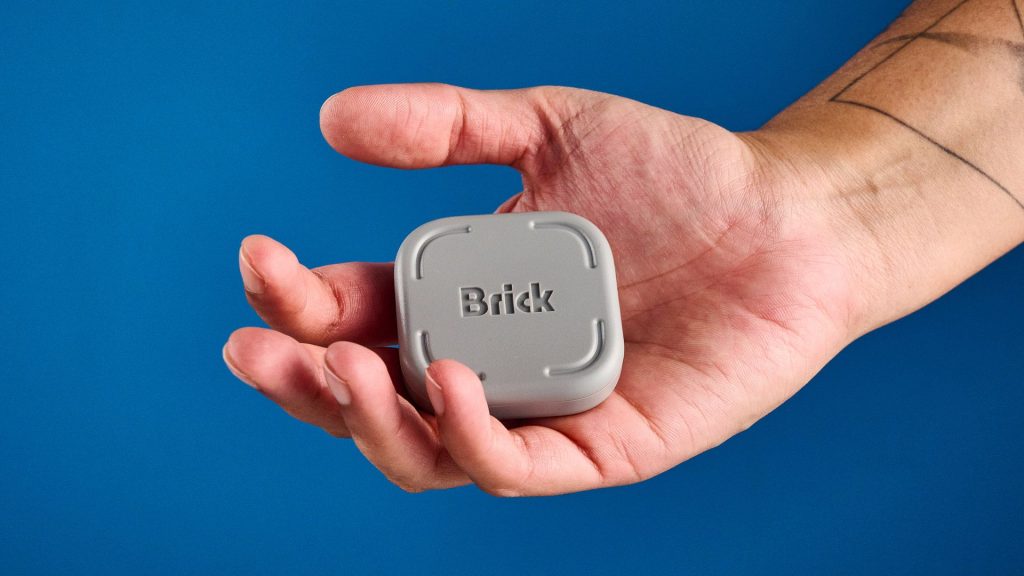
Standard screen time limiters rarely work because bypassing them requires nothing more than pressing a soft “ignore limit” prompt on your display. The Brick provides a physical hardware layer to digital detox by requiring users to physically touch their phone against a dedicated Near Field Communication (NFC) device to unlock restricted applications.
This breakdown examines how The Brick smartphone access blocker helps individuals cut daily screen time by introducing real-world friction to digital habits. By pairing a physical NFC hardware module with a customizable app blocker, this subscription-free device restricts addictive platforms while preserving basic communication tools, making it a practical solution for personal focus and family screen management.
| Feature Parameter | The Brick Smartphone Blocker | Standard Operating System Limiters |
|---|---|---|
| Enforcement Method | Physical NFC hardware tap required | On-screen software prompt |
| Bypass Difficulty | High (Requires physical proximity to device) | Low (Requires one click on “Ignore Limit”) |
| Device Sharing | One physical Brick pairs with multiple household phones | Tied to individual operating system accounts |
| Pricing Structure | One-time hardware purchase (approx. $71) | Free / Pre-installed |
| Emergency Access | Allows basic phone calls and SMS messaging | Full device unblocking upon override |
The Problem with Software Screen Time Limiters
Most modern operating systems come built-in with screen time controls. However, because turning off these software restrictions takes only a fraction of a second, many users quickly develop a habit of ignoring screen warnings altogether. When bypassing a block takes no effort, digital limits fail to curb compulsive app checking.
Constant phone usage leads to real physical and psychological fatigue. From physical finger strain to perpetual distraction during downtime, keeping a smartphone within arm’s reach makes disengaging nearly impossible without physical barriers.
How The Brick Enforces Focus via NFC Hardware
The Brick operates using a small physical hardware block embedded with an NFC chip. Through its companion application, users choose specific non-essential apps or websites to block—such as social media platforms or video streaming channels—while keeping critical features like emergency calls and text messaging active.
Once activated, your smartphone remains in a restricted state until you physically move to where The Brick is located and tap the phone against the accessory. If you place the device in a separate room or upstairs office, unlocking your phone requires getting off the couch or stopping what you are doing. This micro-friction effectively stops passive, mindless scrolling.
Leveraging Micro-Friction to Break Mobile Habits
By placing a physical obstacle between impulse and reward, The Brick weaponizes natural human reluctance to exert extra effort. If unlocking your favorite app requires walking up a flight of stairs or leaving a comfortable living room, most people simply choose to remain present in their offline environment.
According to industry statistics from Reviews.org, average smartphone users check their devices over 180 times daily, spending upwards of five hours looking at displays. Re-establishing control over these habits relies on turning quick digital impulses into deliberate physical actions.
Application for Family Screen Management
Excessive media consumption among younger demographics is increasingly linked to reduced attention spans and behavioral fatigue. Because a single Brick unit can pair with multiple smartphones across a household, parents can implement shared boundary points in communal spaces or home classrooms.
Unlike restrictive parental controls that render devices completely unusable, this approach allows custom profiles. Children and teens retain access to educational tools or safety contacts, while distracting algorithms remain locked away until designated hours.
Frequently Asked Questions
How does The Brick unlock restricted apps?
To unlock your blocked apps, you must open the companion application on your smartphone and physically touch the back of your phone to the Brick hardware unit. The embedded NFC chip communicates with the app to release the temporary restrictions.
Can I still receive phone calls when my phone is locked?
Yes. The companion app lets you select which essential tools remain active. Core functions such as standard phone calls, text messages, navigation maps, and emergency features can stay completely accessible while non-essential platforms are blocked.
Does The Brick require a monthly subscription?
No, The Brick operates as a standalone hardware accessory with a free downloadable companion app. It does not require recurring subscription fees to set up app profiles or lock your device.