
Struggling with a sluggish smart TV interface or looking to bring full app support to an older display? Plug-in streaming media players offer faster operating systems, cleaner home screens, and access to thousands of entertainment apps without needing to replace your television set.
This comparative guide reviews top-tested media players across various budgets and smart home ecosystems, including models from Roku, Google, Apple, and Amazon. It details technical specifications, high dynamic range (HDR) compatibility, surround sound output, and smart features to assist viewers in selecting the ideal 4K streaming device for their living room setup.
Streaming Devices Comparison at a Glance
| Model | Max Resolution | HDR Formats | Supported Audio | Standout Feature |
|---|---|---|---|---|
| Roku Streaming Stick Plus (2025) | 4K UHD @ 60fps | HDR10, HDR10+, Dolby Vision, HLG | DTS Digital Surround | Affordable, compact stick with simple UI |
| Google TV Streamer | 4K UHD | Dolby Vision, HDR10, HDR10+, HLG | Dolby Atmos, Dolby Digital Plus | Live TV integration and smart home hub controls |
| Apple TV 4K (2022) | 4K UHD | Dolby Vision, HDR10+, HDR10, HLG | Dolby Atmos, Apple Lossless, FLAC | A15 Bionic chip for rapid app load times |
| Amazon Fire TV Stick 4K Select | 4K UHD | HDR10, HDR10+, HLG | Dolby Digital Plus, DTS-HD | Budget entry option tied to Alexa voice search |
The Top Tested TV Streaming Devices
1. Roku Streaming Stick Plus (2025) – Best Overall Value
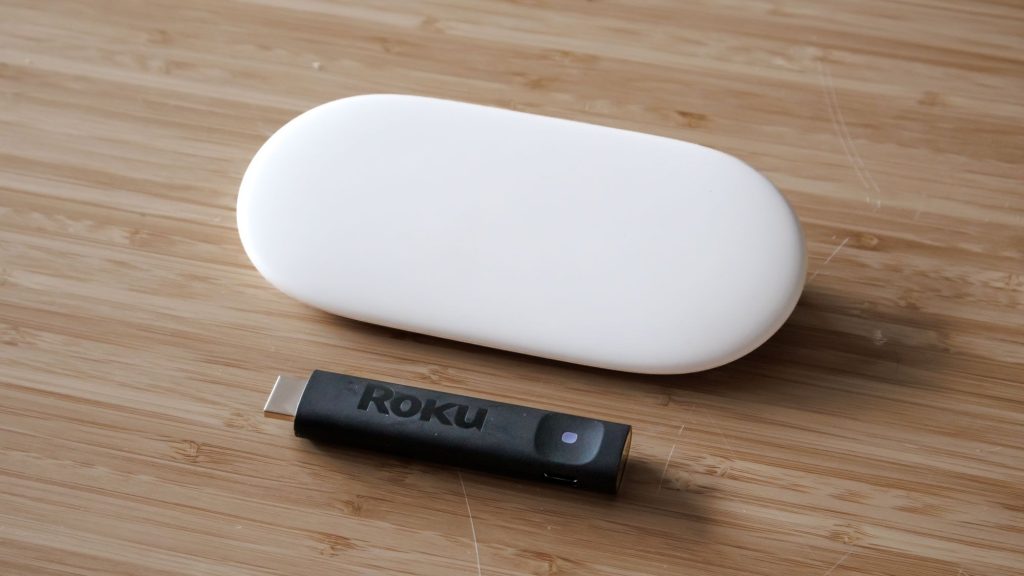
The Roku Streaming Stick Plus continues to hold the top spot for general users thanks to its modest price point, compact design, and straightforward user interface. Measuring just 3.7 inches in length, this device plugs directly into your display’s HDMI port and draws power directly from an available USB port on your TV, eliminating extra cable clutter.
Performance testing yields crisp 4K playback with wide HDR support, including HDR10+ and Dolby Vision. While its bundled remote lacks voice navigation and relies on standard AAA batteries, the platform’s clutter-free menus, quick app loading, and built-in ambient screen features—such as decorative backdrop displays—make it an easy recommendation for most households.
2. Google TV Streamer – Best for Live TV & Smart Home Integration
Replacing the traditional Chromecast form factor, the Google TV Streamer functions as a tabletop console equipped with HDMI 2.1, USB-C, and a built-in Ethernet port. Running on Google TV, it aggregates free live television channels alongside paid streaming services like YouTube TV, Sling, and Philo in a unified electronic program guide.
Beyond broad 4K Dolby Vision and Dolby Atmos playback, this unit integrates directly with Google Home and Matter devices. Viewers can check live security camera feeds, adjust room lighting, or modify smart thermostat settings right from the TV menu. Additionally, Google’s Gemini AI provides automated content summaries and generates custom screensavers directly through voice commands on the redesigned remote control.
3. Apple TV 4K (2022) – Best for Power Users and Apple Ecosystems
Powered by the A15 Bionic processor, the Apple TV 4K delivers faster app launch speeds and smoother navigation across streaming platforms like Netflix, Disney+, and YouTube than most competing players. Its clean tvOS operating system remains free of invasive banner advertising, delivering a refined user experience.
The device supports 4K playback with Dolby Vision and HDR10+, alongside high-resolution audio formats such as Dolby Atmos, FLAC, and Apple Lossless. It features a rechargeable USB-C Siri Remote and includes Thread wireless protocol support for smart home connectivity. Note that Apple has announced an updated Apple TV 4K model, so budget-conscious buyers may want to evaluate upcoming hardware revisions before finalizing a purchase.
4. Amazon Fire TV Stick 4K Select – Best Budget Option for Alexa Users
For households heavily invested in Amazon’s smart ecosystem, the Fire TV Stick 4K Select provides an accessible entry point to 4K streaming. Setup is fast, and the included remote allows users to execute contextual content searches across multiple streaming services using Alexa voice integration.
While video output remains clear in standard HDR10 and HDR10+ formats, this model omits Dolby Vision and Dolby Atmos compatibility. It operates on Amazon’s lighter Vega OS and lacks Wi-Fi 6 connectivity, making it best suited for secondary televisions or standard home networks prioritizing ease of setup over high-end audio-visual features.
How We Evaluate Streaming Media Players
Testing involves assessing initial hardware configuration, menu navigation speed, and content organization. Media players are monitored during extended viewing sessions across diverse content platforms to evaluate 4K video scaling, HDR color accuracy, and sound reproduction quality.
Secondary evaluation metrics include remote control ergonomics, voice control accuracy, multi-device screen mirroring stability, and platform smart home integration. Hardware stability under continuous use is also evaluated to ensure smooth performance across various television brands and monitor inputs.
How to Select the Right Media Player for Your TV
When selecting a streaming device, prioritize platform compatibility and physical connection needs. Viewers wanting a simple interface with minimal setup should lean toward stick-style players like the Roku Streaming Stick Plus. Users seeking hardwired internet stability should target tabletop units with built-in Ethernet ports, such as the Google TV Streamer or Apple TV 4K Ethernet model.
If you regularly use voice assistants or manage smart lights and home cameras, choosing a streaming player aligned with your existing smart home network—whether Google Home, Apple Home, or Amazon Alexa—ensures unified voice control and hardware compatibility.
Frequently Asked Questions
Do I need a smart TV to use a streaming device?
No. Any television equipped with a standard HDMI port can work with a streaming media player. The streaming stick or box handles processing, app storage, and network connectivity independently of your TV’s built-in software.
Can a 4K streaming stick work on a standard 1080p HDTV?
Yes, 4K streaming devices are backward-compatible with 1080p and 720p HD displays. The media player will automatically adjust its resolution output to match the maximum resolution supported by your connected television.
Do TV streaming players require a monthly subscription fee?
The streaming hardware itself requires only a one-time purchase. While the operating system provides free access to ad-supported channels and apps, premium services like Netflix, Hulu, or Max still require separate paid subscriptions.