
Finding an affordable laptop that does not feel cheap or flimsy is a constant battle for students preparing for high school or college. With hardware manufacturers in 2026 splitting focus between ultra-high-end power and budget efficiency, Dell is tackling entry-level value head-on with its new laptop unveiled at IFA 2026.
The Dell 14S is a durable, cost-effective Windows laptop engineered to directly challenge Apple’s budget-friendly MacBook Neo. Positioned right below the premium XPS 13 in Dell’s computer lineup, it features an all-aluminum chassis, Intel Core Series 3 processors, playful color choices, and essential display outputs for students and budget-conscious buyers seeking reliable performance under $650.
Sturdy Aluminum Design and Vibrant Color Options
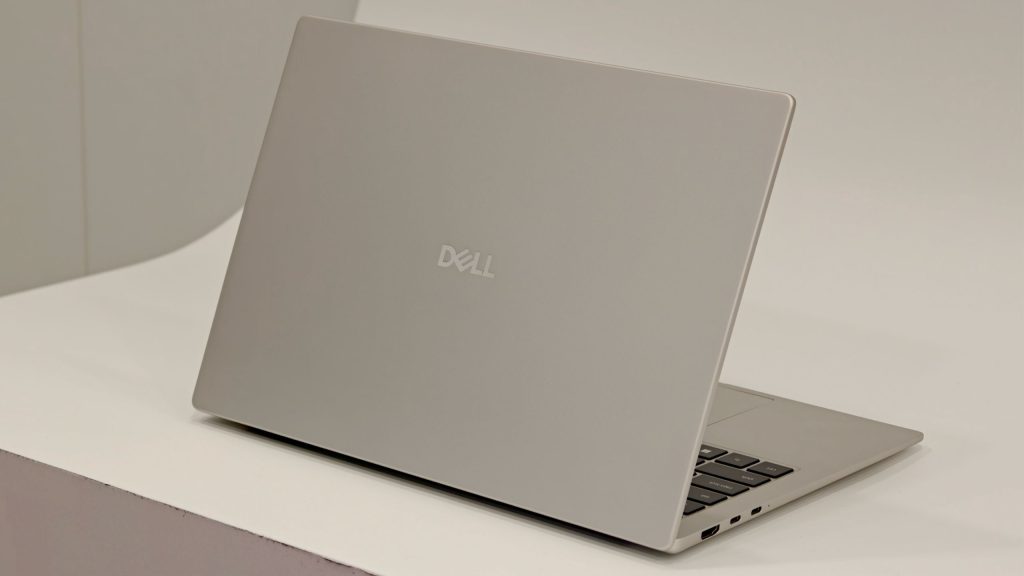
Holding the Dell 14S for the first time reveals build quality remarkably close to the higher-end XPS 13. The all-aluminum body provides substantial rigidity, showing virtually no flex across the keyboard deck or display lid even when pressing firmly. While it carries a bit more weight than some ultra-light alternatives displayed at IFA, the added structural durability is a worthwhile trade-off for daily transport in a backpack.
Dell is also stepping away from dark, monotonous finishes by offering four distinct, modern colors designed to appeal to younger users. Buyers can choose between Linen (a soft beige-silver), Dusty Rose (pink), Velvet Green, and Washed Denim (light blue). These pastel-inspired finishes give the chassis a refined, contemporary look that stands out against traditional budget laptops.
Key Specifications and Hardware Profile
To keep costs reasonable, Dell carefully tailored the internal hardware profile. The Dell 14S runs on Intel’s Core Series 3 “Wildcat Lake” architecture, giving buyers options between Core 5 and Core 7 processors. Memory and storage baseline configurations max out around 8GB of RAM and 256GB of onboard storage, which aligns with standard expectations during ongoing industry-wide memory pricing constraints.
Surprisingly, port selection on the Dell 14S outpaces some of its pricier siblings. Alongside dual USB-C ports, Dell included a full-sized HDMI port—a practical connectivity feature missing from the premium XPS 13 lineup that makes connecting to classroom projectors or home monitors straightforward.
| Feature | Dell 14S Specifications |
|---|---|
| Target Audience | Pre-college, high school students, and budget users |
| Processor | Intel Core Series 3 “Wildcat Lake” (Core 5 / Core 7) |
| Memory & Storage | Up to 8GB RAM / 256GB Onboard Storage |
| Display Options | 2.8K panel at 120Hz or 2K panel at 60Hz |
| Port Selection | 2x USB-C, 1x Full-sized HDMI |
| Colorways | Linen, Dusty Rose, Washed Denim, Velvet Green |
| Estimated Price | Expected between $599 and $649 (US) |
Display Variations, Expected Price, and Release Window
Visual quality is handled via two distinct screen configurations. The upper-tier configuration features a crisp 2.8K display running at a smooth 120Hz refresh rate, while the entry-level edition steps down to a standard 2K panel operating at 60Hz. Both options offer clear text rendering and solid color representation for classwork and everyday streaming.
Official pricing for the United States has not yet been formally announced by Dell. However, given that the XPS 13 anchors the lineup at approximately $699, the Dell 14S is projected to land near the $599 to $649 price point. Dell confirmed that the laptop is scheduled to hit the U.S. market in the fall, with final regional pricing revealed closer to launch.
Frequently Asked Questions
How does the Dell 14S differ from the Dell XPS 13?
The Dell 14S sits one tier below the XPS 13 in Dell’s lineup, focusing on durability and value for students. It offers fun color options, Intel Wildcat Lake chips, and a full-sized HDMI port, whereas the XPS 13 emphasizes higher baseline specifications and an ultralight profile at a higher starting price.
What display options are available on the Dell 14S?
Dell offers the 14S with two panel options: a standard 2K display with a 60Hz refresh rate for basic daily tasks, and a higher-resolution 2.8K display with a smooth 120Hz refresh rate for improved visual clarity.
Does the Dell 14S include a full-sized HDMI port?
Yes, unlike the more expensive XPS 13, the Dell 14S includes a built-in full-sized HDMI port alongside two USB-C ports, making it easier to connect external displays without needing adapters.