
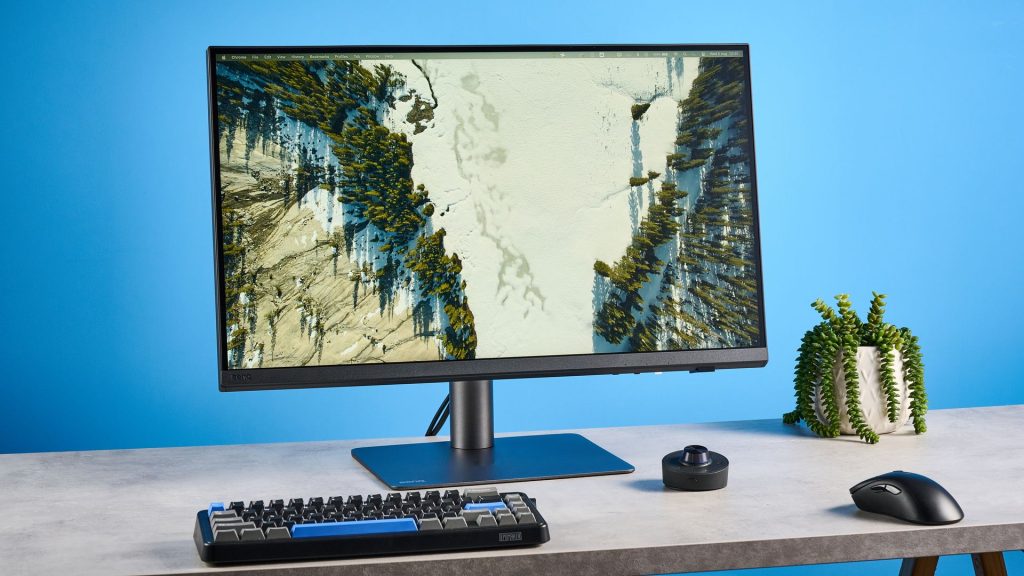
Finding a display that delivers professional-grade color accuracy without an enterprise price tag remains a tough challenge for visual creators. The BenQ Creative Pro PD2732U fills this gap by offering high-end color accuracy and robust connectivity at a fraction of the cost of premium displays like Apple’s Studio Display.
This analysis examines the BenQ Creative Pro PD2732U 4K monitor, highlighting its color performance, design features, and port selection. Ideal for photographers, print designers, and video editors who prioritize color fidelity over high refresh rates, this display provides factory-calibrated accuracy for demanding creative workflows under $700.
BenQ Creative Pro PD2732U Specifications & Benchmarks
To evaluate how this monitor fits into a creative setup, reviewing key hardware metrics and color benchmarks helps illustrate its capabilities against competitors.
| Metric / Feature | BenQ Creative Pro PD2732U | Apple Studio Display |
|---|---|---|
| Price | $699 / £649 | $1,499 |
| Display Size & Resolution | 27-inch 4K UHD (3840 x 2160), 163 DPI | 27-inch 5K (5120 x 2880), 218 DPI |
| Panel Type & Refresh Rate | 10-bit IPS, 60Hz, 5ms response time | IPS, 60Hz |
| sRGB Color Coverage | 147.1% | 114.1% |
| DCI-P3 Color Coverage | 104.2% | 80.8% |
| Color Accuracy (Delta-E) | 0.11 (Lower is better) | 0.20 |
| Peak Brightness (SDR) | 182.6 nits | 518 nits |
| Primary Connectivity | HDMI 2.0, DP 1.4, 2x Thunderbolt 4 (90W PD) | Thunderbolt 3 (96W PD), 3x USB-C |
Design, Ergonomics, and Port Selection
The BenQ Creative Pro PD2732U departs from standard gray monitor styling, featuring a gunmetal finish and metal accents. Weighing 18.87 pounds with the stand, the chassis feels sturdy on the desk and offers smooth height and tilt adjustments without unwanted wobble.
Connectivity options are extensive. Around the back, the panel houses an HDMI 2.0 port, DisplayPort 1.4, and two Thunderbolt 4 ports supporting daisy-chaining and 90W power delivery. This allows you to power laptops like a MacBook Air or MacBook Pro through a single cable while transmitting video and data.
A built-in USB hub adds three USB-A downstream ports (with speeds up to 5Gbps) and a USB-C upstream port. Integrated Smart KVM functionality lets users control two connected computers using a single mouse and keyboard. BenQ also includes a bundled cable management clip that attaches to the stand upright to keep your desk clutter-free.
Color Performance and Creator Features
Color fidelity is the primary selling point of the PD2732U. In lab evaluations, the monitor covered 147.1% of the sRGB gamut and 104.2% of the wider DCI-P3 space, outperforming the Apple Studio Display in DCI-P3 color reach. Its tested Delta-E score of 0.11 demonstrates near-perfect out-of-the-box color presentation.
Unlike some competing monitors, the PD2732U includes a dedicated Adobe RGB preset, making it particularly valuable for photographers preparing images for CMYK print reproduction. The panel is Calman Verified, Pantone Validated, and Pantone SkinTone Validated, ensuring precise human skin tone rendering across digital and print mediums.
Mac users benefit from M-book Mode, which aligns the display’s output with native macOS screen profiles. The monitor also features iDevice Color Sync, iKeyboard Control for brightness adjustment via laptop keys, and Eye Care flicker-free technology to reduce eye fatigue during long editing sessions.
Workflow speed is further enhanced by BenQ’s included Hotkey Puck remote. This gunmetal controller features customizable hotkeys and a scroll wheel, giving instant access to picture modes, brightness settings, and input sources without reaching for rear OSD buttons.
Trade-offs and Performance Limitations
Despite its strengths in color accuracy, the PD2732U has clear trade-offs. SDR peak brightness reached only 182.6 nits in testing, with HDR performance topping out at 184 nits. This conservative output stems partly from BenQ’s Uniformity Technology, which prioritizes balanced lighting across the panel over maximum brightness.
Additionally, the panel is locked to a 60Hz refresh rate. While 60Hz is standard for color-critical photo editing and document work, editors scrubbing through high-framerate 120fps video timelines may find it limiting compared to higher refresh rate monitors.
Frequently Asked Questions
Is the BenQ PD2732U suitable for photo printing work?
Yes, the monitor includes a dedicated Adobe RGB color mode and carries both Pantone and Calman certifications. Its wide color coverage ensures printed media closely matches what appears on screen.
How does the BenQ PD2732U compare to Apple’s Studio Display?
The BenQ offers wider DCI-P3 color coverage (104.2% vs. 80.8%) and better color accuracy out of the box at less than half the price. However, Apple’s Studio Display offers higher peak brightness and a sharper 5K resolution.
Can the BenQ PD2732U power a laptop directly?
Yes, its Thunderbolt 4 connection delivers up to 90W of power. This allows you to charge your laptop while driving 4K display output and transferring data over a single cable.