
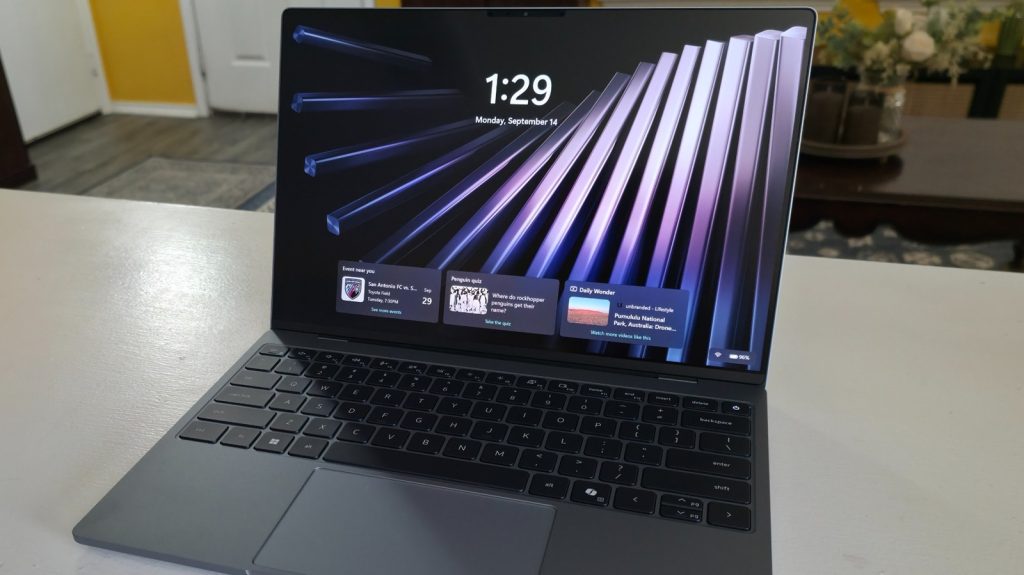
Finding a compact laptop that strikes the right balance between portable engineering, reliable daily performance, and budget-friendly pricing can be a challenge.
This review of the Dell XPS 13 covers the lightweight 13.4-inch Windows 11 notebook, analyzing its build quality, 2.5K touchscreen display, processing hardware, and everyday functionality. Built specifically for high school and college students, remote workers, and mobile professionals, this portable system delivers scalable performance starting at $699, with qualified student discounts reducing the baseline entry price down to $599.
Sleek Design and Hardware Specifications
Dell designed the XPS 13 to prioritize ultra-portable convenience without sacrificing structural durability. Weighing just 2.2 pounds with a slim profile measuring 0.5 inches thick, the laptop slides easily into backpacks and messenger bags. Its compact footprint—11.69 inches wide by 7.9 inches deep—is paired with a sturdy chassis and an ergonomic backlit keyboard that makes long typing sessions comfortable.
Underneath its aluminum exterior, the entry-level model packs capable hardware tailored for everyday productivity. Buyers looking for extra memory or storage can configure the machine with higher-tier components directly through Dell, choosing between two primary chassis colors: Sky and Storm.
| Specification | Base Configuration | Upgraded / Max Configuration |
|---|---|---|
| Processor | Intel Core 5 320 (6 Cores, up to 4.6 GHz, 6MB Cache) | Intel Core Ultra 7 355 (8 Cores, up to 4.7 GHz) |
| RAM | 8GB LPDDR5x | Up to 32GB LPDDR5x (7476 MT/s) |
| Storage | 256GB M.2 PCIe NVMe SSD | 512GB to 1TB M.2 PCIe NVMe SSD |
| Display | 13.4-inch 2.5K (30-120Hz, 500 nits, Touch) | 13.4-inch 2.5K (30-120Hz, 500 nits, Touch) |
| Weight & Thickness | 2.2 lbs / 0.5 inches | 2.2 lbs / 0.5 inches |
| Standard Price | $699 | Up to $1,799 |
| Student Price | $599 ( verified discount ) | Varies by configuration |
Touchscreen Display and Multimedia Experience
One of the standout features of the Dell XPS 13 is its standard 13.4-inch 2.5K InfinityEdge touchscreen display. Offering a variable refresh rate ranging from 30Hz to 120Hz and up to 500 nits of brightness, the panel delivers clear visuals while maintaining power efficiency during web browsing, document editing, and video streaming.
The inclusion of intuitive multi-touch support allows users to pinch, zoom, and swipe through applications much like a smartphone, providing a practical alternative to the integrated glass touchpad. Beyond the screen, Dell equips the laptop with a 1080p 30 FPS FHD camera supported by Windows Hello facial recognition and a dual-microphone array. Audio performance is equally strong, powered by a quad-speaker arrangement producing an 8-watt peak output.
Processing Performance and Port Selection
The base Intel Core 5 320 processor handles everyday multitasking smoothly, maintaining stable responsiveness across web browsers, office suites, and collaboration tools like Slack. For users demanding higher computing output for complex workloads, upgrading to the Intel Core Ultra 7 355 configuration unlocks additional processing cores and memory overhead.
To achieve its ultra-thin chassis, Dell limited the physical port selection. The laptop features two USB Type-C ports equipped with DisplayPort 2.1 video output and Power Delivery capabilities. Because one port is required for charging, users who rely on legacy USB-A accessories, dedicated headphone jacks, or external HDMI displays will need to utilize external USB-C hubs or adapters.
Student Pricing and Market Competition
Dell offers dedicated educational pricing that positions the XPS 13 aggressively in the market. High school and college students aged 16 and older who verify their status through Dell Rewards can secure the base model for $599, a savings of roughly 14% off the standard $699 retail price. This discount offer is active through November 2, 2026.
When evaluated against its closest competitor, the Apple MacBook Neo, the Dell XPS 13 holds clear advantages in hardware flexibility and touch interaction:
- Touch Interaction: The XPS 13 features a standard 2.5K touchscreen, whereas the MacBook Neo lacks touch capabilities entirely.
- Memory Upgrades: Dell allows memory configurations up to 32GB RAM, while the MacBook Neo limits baseline capacity options.
- Operating System Choice: The XPS 13 offers a familiar Windows 11 environment for users outside the macOS ecosystem.
Final Verdict: Who Should Buy the Dell XPS 13?
The Dell XPS 13 is a practical, lightweight Windows 11 laptop designed for mobility and everyday productivity. While heavy gamers and specialized media editors will require a machine with dedicated graphics hardware, the XPS 13 offers exceptional value for students, parents, and remote workers who need dependable computing in a compact form factor.
Frequently Asked Questions
Does the baseline Dell XPS 13 include a touchscreen?
Yes, the baseline Dell XPS 13 comes equipped with a 13.4-inch 2.5K multi-touch display featuring a 30-120Hz refresh rate and 500 nits of brightness.
How do students qualify for the discounted price on the XPS 13?
High school and college students age 16 or older can join Dell Rewards, verify their student identity on Dell’s website, and instantly receive a discount reducing the base price from $699 to $599.
What physical ports are available on the Dell XPS 13?
The laptop features two USB Type-C ports supporting DisplayPort 2.1 output and Power Delivery. It does not include traditional USB-A ports, a 3.5mm audio jack, or a native HDMI port.