Finding a craft cutting machine that balances high-end capability with beginner-friendly setup often means choosing between raw technical power and usability. The Cricut Maker 5 bridges this gap by bundling specialized tools alongside a sleeker, lidless redesign engineered for faster project execution.
This evaluation breaks down the Cricut Maker 5, examining its expanded 3mm clearance, 14.1 inch-per-second cut speeds, and Design Space app integration. Ideal for hobbyists, Etsy creators, and DIY customizers, this review outlines pricing, bundle inclusions, real-world vinyl and engraving performance, and overall value compared to previous generations.
Design Upgrades and Key Technical Specifications
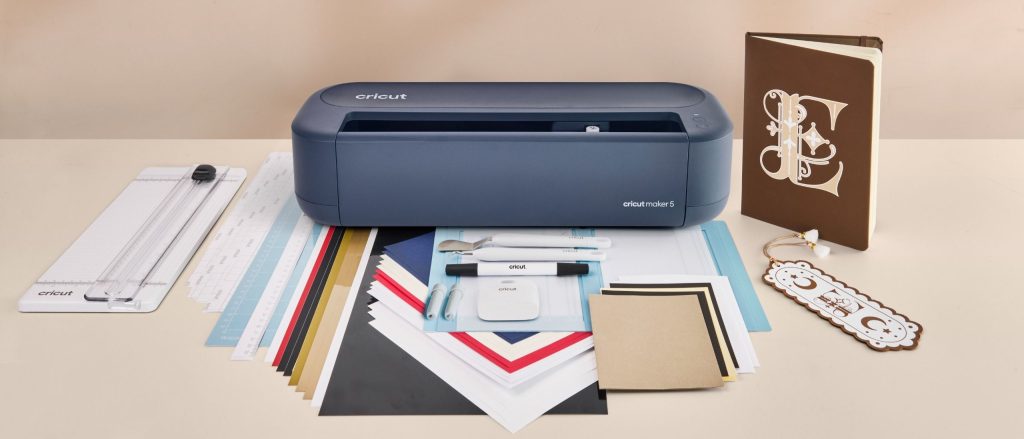
The Cricut Maker 5 introduces significant structural changes over its predecessors. Taking visual cues from the Explore line, the Maker 5 adopts a lidless, flat-top chassis that is 30% more compact than the Maker 4. This flat top serves as a convenient temporary resting tray for hand tools mid-project. Physical controls on the unit are simplified to illuminated power and pause/play buttons on the front panel, and the machine debuts in a Slate Blue finish.
Under the hood, the cutting clearance has increased to 3mm—a 25% elevation compared to the 2.4mm limit on older units. This expansion allows users to cut, engrave, or score across more than 300 compatible materials, including thicker woods, leathers, and aluminum sheets. The unit supports up to 13 interchangeable quick-swap tools and cuts at rates up to 14.1 inches per second.
| Specification | Details |
|---|---|
| Base Retail Price (RRP) | $349 / £349.99 / AU$699 |
| Essentials Bundle Price | $399 / £399.99 / AU$699 (Standard inclusion in Australia) |
| Dimensions & Weight | 19.8 x 7.5 x 4.7 in (50.2 x 19.05 x 11.9 cm) | 10.9 lbs (4.94 kg) |
| Material Clearance | Up to 3.0 mm thick (25% increase over Maker 4) |
| Maximum Cut Speed | Up to 14.1 in per second |
| Mat-Based Cut Size | 11.5 x 23.75 in (29.2 cm x 60.3 cm) |
| Matless Cut Size (Smart Materials) | 12 in x 12 ft (30.5 cm x 3.6 m) |
| Tool Ecosystem | 13 compatible tools (Backwards-compatible with older blades) |
| Included Warranty | 2 years |
Out-of-the-Box Bundles and Accessories
One of the primary friction points for new electronic cutting machine owners is sourcing necessary initial supplies. Cricut addresses this with curated material bundles. In markets like the US and UK, buyers can choose between the standalone machine or step up to the Essentials Bundle for an extra $50 / £50. In Australia, the machine automatically ships with the Essentials Bundle for AU$699.
The Essentials package supplies material for approximately 65 starter projects. Inside, crafters receive a Premium Fine-Point Blade, a Scoring Blade, and an Engraving Blade—the latter two normally sold as standalone add-ons. It also packs a portable trimmer, mini weeding tool, Fine Point Pen, Light Grip machine mat, card mat, cardstock, iron-on sheets, printable vinyl, transfer tape, and Smart Vinyl rolls.
Replacing consumables over time remains an ongoing cost factor. Standard 4ft rolls of Cricut Smart Vinyl cost roughly $8.99 / £7.49 / AU$15. Replacement blade housings range between $37.99 / £39.99 / AU$50, though legacy tools remain backward compatible with the Maker 5 chassis.
Real-World Testing: Heat-Transfer Vinyl and Aluminum Engraving
Real-world testing highlighted two representative crafting applications: customized iron-on fabric work and rigid surface engraving.
Iron-On Vinyl Application
Cutting heat-transfer vinyl (HTV) on the included Light Grip mat demonstrated the machine’s enhanced motor efficiency. After constructing a text graphic within the workspace software, the Maker 5 completed the entire mirror-cut path on white HTV in seconds. Weeding the negative space was straightforward, and heat pressing the graphic onto a cotton fleece hoodie using standard protective baking paper yielded sharp, crisp edges without adhesive bleed.
Metal Surface Engraving
Engraving tests were conducted using an aluminum sheet paired with the specialized engraving tip. The increased clearance and firm tool clamping permitted rapid micro-carving into the metal. The mechanical action runs noticeably quiet compared to older cutting units. However, material placement accuracy remains a critical user factor. Crafters must manually cross-reference physical mat grid markers against the software preview canvas to avoid off-center graphic alignment.
Software Integration: Cricut Design Space
The Maker 5 relies entirely on the Cricut Design Space application, available on PC, Mac, iOS, and Android platforms. The machine operates via direct Wi-Fi pairing and requires roughly 3 inches (10 cm) of rear physical clearance to allow mat passthrough during operation.
Recent software revisions have addressed previous stability issues by introducing streamlined “Guided Flows.” This step-by-step assistant isolates required tools and material presets based on the active job, reducing manual setting errors. Subscribers to the Cricut Access library ($9.99 / £7.49 / AU$13.99 monthly) gain access to custom single-layer graphics generation via Create AI alongside an expanded library of premade templates, fonts, and community SVGs.
Final Assessment: Is the Cricut Maker 5 Worth It?
The Cricut Maker 5 refine mechanical precision while stripping away unnecessary bulk. While existing Maker 4 owners may not need an immediate upgrade given identical core tool back-compatibility, the Maker 5 represents a strong entry point for newcomers, older machine upgraders (such as Maker 3 or Explore users), and small-business creators. The inclusion of full tool sets in the Essentials package delivers strong immediate value right out of the box.
Frequently Asked Questions
Can I use my existing Cricut Maker blades with the Maker 5?
Yes, the Cricut Maker 5 features backward compatibility with legacy tools and quick-swap housings designed for prior Maker generation machines. You can seamlessly transition your existing fine-point, deep-point, rotary, or knife blades to the new device.
Do I need a paid subscription to use the Cricut Maker 5?
No, the Cricut Design Space app is free to download and use with standard functionality, including loading personal SVG files and basic design tools. A paid Cricut Access subscription is purely optional for users seeking access to thousands of ready-made designs, premium fonts, and AI vector generation tools.
What is the maximum material thickness the Cricut Maker 5 can cut?
The Cricut Maker 5 supports materials up to 3.0 mm thick. This 25% increase in clearance over the Maker 4 allows crafters to work with denser materials such as balsa wood, tooling leather, heavy matboard, and aluminum sheets for engraving.