
Carrying heavy textbooks and bulky laptops between back-to-back lectures is a hassle many college and high school students face every semester. Switching to a capable tablet can lighten your backpack while offering enough battery life and processing power to handle lecture notes, research assignments, and evening entertainment.
This guide highlights the top student tablets for 2026 based on hands-on battery testing, note-taking capabilities, and general productivity performance. It covers options ranging from affordable budget devices to powerful laptop replacements, helping students select the ideal slate based on their operating system preferences, class requirements, and available budget.
Best Student Tablets Overview
| Tablet Model | Category | Display Size | Tested Battery Life | Starting Storage |
|---|---|---|---|---|
| Apple iPad 11 | Best Overall | 11-inch Liquid Retina | 11 hrs 25 mins | 128GB |
| Motorola MotoPad (2026) | Best Budget | 11-inch LCD | 10 hrs 31 mins | 128GB |
| Microsoft Surface Pro 11 | Best Laptop Replacement | 13-inch LCD / OLED | 12 hrs 10 mins | 256GB / 512GB |
| Apple iPad Air M4 | Best Premium Pick | 11-inch or 13-inch | 9 hrs 44 mins | 128GB |
| ReMarkable Paper Pro | Best for Note-Taking | 11.8-inch Canvas Color | 2+ Weeks | 64GB |
Top Student Tablets Reviewed
1. Apple iPad 11 — Best Overall
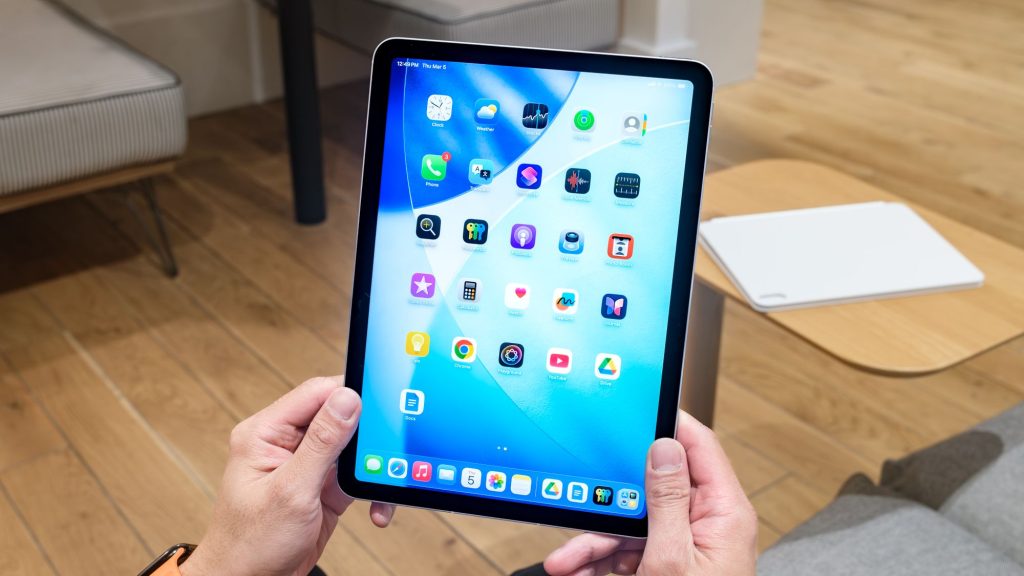
The standard Apple iPad 11 balances affordability with reliable everyday performance, making it the top choice for most students. Powered by the Apple A16 Bionic processor with 6GB of memory, it handles multitasking, video calls, and research without noticeable lag. It weighs just 1.05 pounds, making it easy to carry around campus all day.
In lab testing, the iPad 11 lasted 11 hours and 25 minutes during continuous web browsing over Wi-Fi at 150 nits of screen brightness. Its 11-inch Liquid Retina display (2360 x 1640) delivers crisp text for reading digital textbooks. The baseline storage has been upgraded to 128GB, providing plenty of room for files and course materials.
Pros:
- Lightweight and highly portable design
- Fast A16 performance for daily tasks
- Upgraded 128GB base storage capacity
- All-day battery stamina
Cons:
- Screen can appear dim in bright outdoor conditions
- Lacks Apple Intelligence features
- Incompatible with the latest Apple Pencil Pro
2. Motorola MotoPad (2026) — Best Budget Pick
For students watching their spending, the Motorola MotoPad (2026) delivers excellent value at a budget price point around $249. Weighing 1.06 pounds, this 11-inch Android tablet features an LCD display with a 2560 x 1600 resolution and loud built-in speakers that make listening to recorded lectures or streaming video enjoyable.
Equipped with 8GB of RAM and 128GB of internal storage, the MotoPad reliably handles standard schoolwork like writing notes, reading PDFs, and web browsing. In battery benchmarks, it recorded 10 hours and 31 minutes of continuous use, ensuring it can easily clear a standard day of classes without needing a wall charger.
Pros:
- Highly accessible price for budget-conscious buyers
- Impressive battery life for long study sessions
- Solid dual speakers for audio playback
- Bright, colorful display screen
Cons:
- Weak graphical processing power for gaming
- Modest overall system speeds
3. Microsoft Surface Pro 11 — Best Laptop Replacement
If you need full desktop software in a tablet form factor, the Microsoft Surface Pro 11 is the top Windows alternative. Driven by Qualcomm Snapdragon X Series processors, this 2-in-1 device offers desktop-class software compatibility alongside remarkable energy efficiency and speed.
Featuring a 13-inch display (available in LCD or vibrant OLED variants), the Surface Pro 11 lasted an impressive 12 hours and 10 minutes in battery testing. While it excels at running full Windows 11 productivity tools, optional accessories like the Surface Flex Pro keyboard and Surface Slim Pen stylus are sold separately and add to the initial investment.
Pros:
- Exceptional Snapdragon X processing speed
- Category-leading battery life exceeding 12 hours
- High-quality OLED or LCD display options
- Runs full Windows desktop applications
Cons:
- Official keyboard and stylus peripherals are expensive
- Occasional app compatibility quirks with Arm architecture
4. Apple iPad Air M4 — Best Premium Option
Students looking for extra performance for creative coursework, photo editing, or heavy multitasking will appreciate the Apple iPad Air M4. Packed with Apple’s M4 silicon and 12GB of RAM, this tablet delivers performance levels rivaling modern premium laptops while maintaining a sleek 0.24-inch thin profile.
The Liquid Retina screen offers rich colors and sharp details, available in both 11-inch and 13-inch sizes. However, battery endurance reached 9 hours and 44 minutes during lab testing—solid for an ultra-thin tablet, but lower than the standard iPad 11. It remains an excellent upgrade for users already immersed in the Apple software ecosystem.
Pros:
- Mighty M4 chip performance
- Sleek, lightweight aluminum design
- Supports advanced creative software
Cons:
- Shorter battery life compared to the standard iPad
- Lacks Face ID biometric unlocking
- Expensive official keyboard accessories
5. ReMarkable Paper Pro — Best Dedicated Note-Taking Slate
The ReMarkable Paper Pro targets students who prefer the physical feel of pen and paper without digital distractions. Unlike traditional multimedia tablets, it uses an 11.8-inch Canvas Color e-paper display with a textured surface that replicates writing on actual paper using the included Marker stylus.
This color e-paper slate allows students to review textbooks, mark up documents, and organize handwritten notes in over ten colors. Because it omits web browsers, social media apps, and video streaming services, its battery lasts several weeks on a single charge while keeping study time focused purely on writing and reading.
Pros:
- Realistic paper-like writing sensation
- Color e-paper screen makes text annotations clear
- Distraction-free environment for reading and study
- Multi-week battery longevity
Cons:
- Slower display refresh rates inherent to e-paper tech
- Cannot stream videos or download general mobile apps
Student Tablet Battery Life Comparison
Battery endurance is a critical factor when choosing a device for campus life. Devices are tested in an automated environment by setting screen brightness to 150 nits and continuously browsing the web over Wi-Fi until the battery drains fully.
- Microsoft Surface Pro 11: 12 hours, 10 minutes
- Apple iPad 11: 11 hours, 25 minutes
- Motorola MotoPad (2026): 10 hours, 31 minutes
- Apple iPad Air M4: 9 hours, 44 minutes
- ReMarkable Paper Pro: Multi-week capacity (e-paper design)
How to Select the Right Student Tablet
When selecting a tablet for school, start by evaluating your primary operating system. iPhone users benefit from seamless sync with iPadOS on the standard iPad or iPad Air, while Android users will find native integration on Android slates. If your degree requires specific desktop programs, a Windows device like the Surface Pro 11 is the safest selection.
Consider whether handwritten notes or typed essays dominate your daily routine. If you write long papers, budget for a detachable keyboard case. For handwritten formulas, diagrams, and margins markup, prioritize devices with low stylus latency, or opt for an e-paper tablet if pencil-on-paper feel is your primary goal.
Frequently Asked Questions
What is the best overall tablet for a student on a budget?
The standard Apple iPad 11 is generally the best option for most students due to its strong performance, reliable 11-plus hour battery life, and high resale value. Budget shoppers seeking an even lower price point should consider the Motorola MotoPad, which offers solid basics for under $300.
Can a tablet fully replace a student laptop?
A tablet can replace a laptop for tasks like note-taking, reading assignments, web research, and basic essay writing when paired with a keyboard. However, students who require specialized engineering tools, coding environments, or heavy desktop multitasking will still benefit more from a traditional laptop or a full Windows tablet like the Surface Pro 11.
How much storage capacity should a student select?
For general note-taking, streaming, and cloud-based file management, 128GB of storage is sufficient for most students. If you plan to download entire textbook libraries, offline video lectures, creative software projects, or games, opting for 256GB or higher is recommended.